“Parle-G 100 gm available hai?”
Help customers find the item and pack they want.
Text messages, voice notes or a photo of a handwritten list. Bring product questions and order requests into one WhatsApp conversation.
Hindi, Hinglish and English. No new app for your customers.
Try each example to see how the same order starts in different formats. Clear items can move into the cart while unclear details are checked.
Customers can type product names, quantities and selling units just as they normally would. Mulltiply helps match them to your catalogue.
Illustrative conversation. Unclear items need clarification before they are confirmed.
Customers can speak their order instead of typing. Mulltiply helps identify the requested items and asks about anything that needs clarification.
Illustrative conversation. Unclear items need clarification before they are confirmed.
Customers can send a photo of a handwritten order. Mulltiply matches readable lines to your catalogue and asks customers to confirm unclear names or numbers.
Illustrative conversation. Unclear items need clarification before they are confirmed.
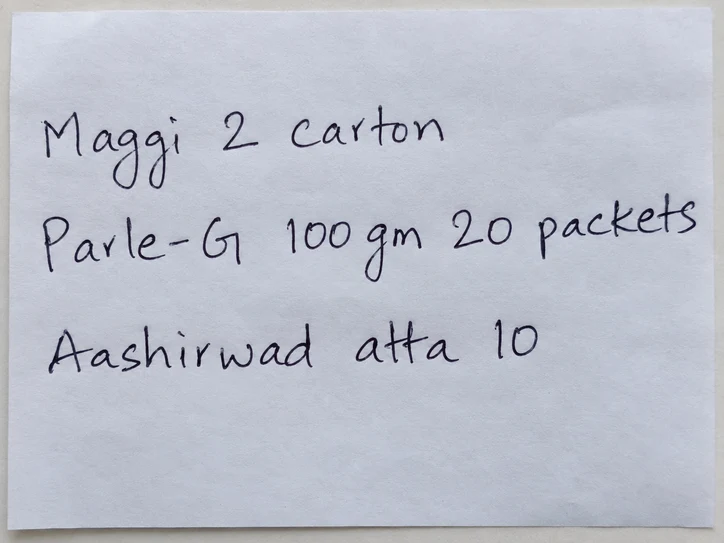 Ye order bhej dena.10:42 AM
Help customers check product details, prices and availability using the business information you’ve connected.
Help customers find the item and pack they want.
Use your configured product and customer pricing.
Respond using the stock information available to your setup.
Prices and availability depend on the connected data and how recently it was updated.
Keep the customer in control. An uncertain product, pack size or quantity should lead to a question before confirmation.
Recognise product questions and order items from messages, voice notes or a photographed list.
Match names, variants, pack sizes, selling units and quantities to the catalogue.
Ask a focused question when a product or number has more than one possible meaning.
Add clearly matched items while unresolved items remain pending.
Show the cart so the customer can check the products and quantities before placing the order.
Does the customer want the 5 kg or 10 kg pack? If the quantity or selling unit is also unclear, confirm that too.
Customer confirms
“5 kg ke 10 packs.”
An example of clarification, not a guarantee that every message or handwriting sample will be understood correctly.
After customer review and confirmation, the order can move into your order-management and connected ERP workflow.
Stock allocation, fulfilment and delivery follow your operational process and integration setup.
Yes. Customers can ask product questions and send order requests in Hindi, Hinglish or English, including messages that mix languages.
These examples cover voice notes sent inside WhatsApp. A live calling agent is a separate workflow.
Background noise, faint writing, unfamiliar names and unclear numbers can affect recognition. Uncertain details should be clarified with the customer before those items are finalised.
Mulltiply can ask the customer to choose the right variant, such as a 5 kg or 10 kg atta pack, and clarify the quantity or selling unit where needed.
Yes. Clearly matched items can be added to the cart while unresolved items remain pending. The customer can review the cart before confirming.
The conversation prepares the order details and cart. The customer reviews and confirms before the order moves forward.
No system can guarantee that every handwritten note will be read correctly. A clear, well-lit photo helps; unreadable or ambiguous details need customer clarification.
Yes, using the catalogue, pricing and stock information connected to the business. The accuracy and freshness of those answers depend on that data.